
Power BI
Integrera Power BI i LoopSign
Section titled “Integrera Power BI i LoopSign”För att visa innehåll från Power BI i LoopSign måste du använda inbäddningsfunktionerna.
- Välj Arkiv i Power BI, sedan Bädda in rapport och sedan Publicera på webben (offentlig).
- Använd URL:en i LoopSigns Website-widget, eller inbäddningskoden i HTML Code-widgeten.
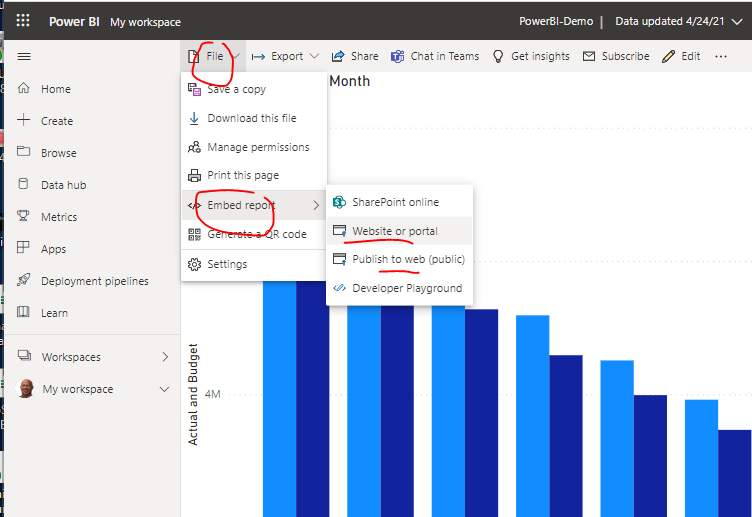
English: File · Embed report · Publish to web (public)
Besök räknas med Umami på Loop24:s egen server i Stockholm. Inga cookies används och inga IP-adresser lagras.
Microsoft, Windows, Microsoft Edge, Entra, Exchange, Microsoft 365, Outlook, Power BI and Teams are trademarks of the Microsoft group of companies. Android, Google Play, Google Workspace, Google Sheets and Google Slides are trademarks of Google LLC. App Store is a service mark of Apple Inc. Other product and company names belong to their owners; they say what LoopSign, LoopMeeting, LoopBooking and LoopVisit work with, and imply no affiliation or endorsement.