
Power BI
Power BI:n integroiminen LoopSigniin
Osio ”Power BI:n integroiminen LoopSigniin”Jos haluat näyttää Power BI -sisältöä LoopSignissa, sinun on käytettävä upotustoimintoja.
- Valitse Power BI:ssä Tiedosto, sitten Upota raportti ja sitten Julkaise verkkoon (julkinen).
- Käytä URL-osoitetta LoopSignin Website-widgetissä tai upotuskoodia widgetissä HTML Code -widget.
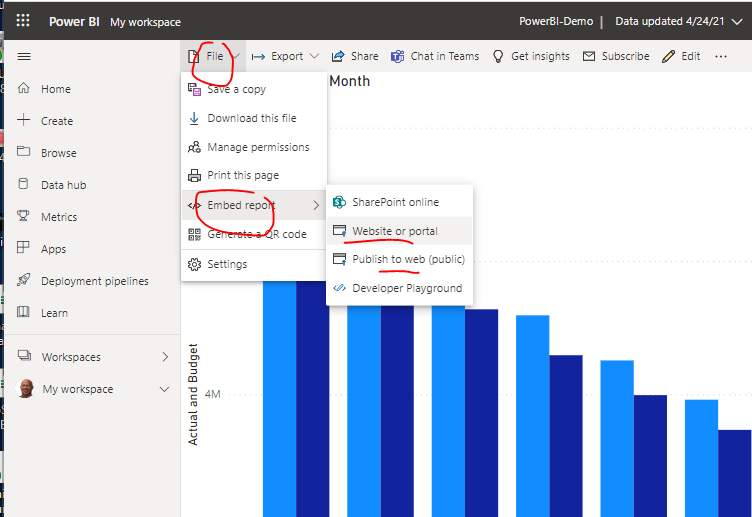
English: File · Embed report · Publish to web (public)
Käynnit lasketaan Umamilla Loop24:n omalla palvelimella Tukholmassa. Evästeitä ei käytetä, eikä IP-osoitteita tallenneta.
Microsoft, Windows, Microsoft Edge, Entra, Exchange, Microsoft 365, Outlook, Power BI and Teams are trademarks of the Microsoft group of companies. Android, Google Play, Google Workspace, Google Sheets and Google Slides are trademarks of Google LLC. App Store is a service mark of Apple Inc. Other product and company names belong to their owners; they say what LoopSign, LoopMeeting, LoopBooking and LoopVisit work with, and imply no affiliation or endorsement.