
Power BI
Power BI integreren in LoopSign
Section titled “Power BI integreren in LoopSign”Om Power BI-content in LoopSign te tonen, moet je de functies voor insluiten gebruiken.
- Selecteer in Power BI Bestand, daarna Rapport insluiten en daarna Publiceren op internet (openbaar).
- Gebruik de URL in de Website-widget van LoopSign, of de invoegcode in de HTML Code-widget.
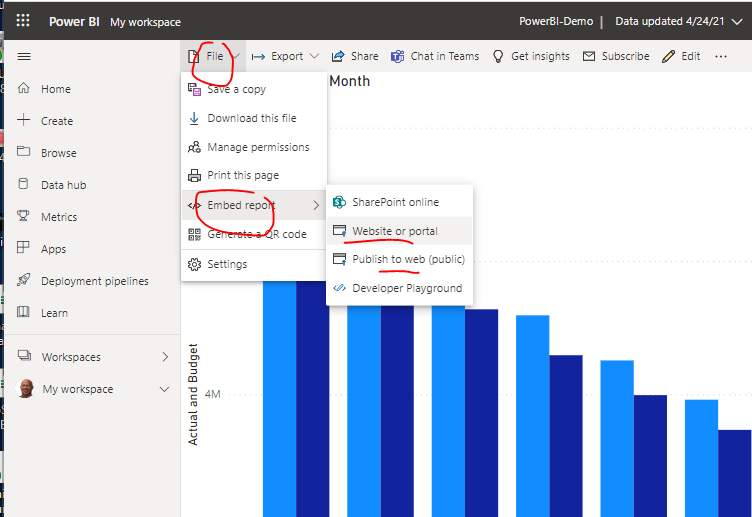
English: File · Embed report · Publish to web (public)
Bezoeken worden geteld met Umami op de eigen server van Loop24 in Stockholm. Er worden geen cookies gebruikt en geen IP-adressen opgeslagen.
Microsoft, Windows, Microsoft Edge, Entra, Exchange, Microsoft 365, Outlook, Power BI and Teams are trademarks of the Microsoft group of companies. Android, Google Play, Google Workspace, Google Sheets and Google Slides are trademarks of Google LLC. App Store is a service mark of Apple Inc. Other product and company names belong to their owners; they say what LoopSign, LoopMeeting, LoopBooking and LoopVisit work with, and imply no affiliation or endorsement.