
Power BI
Integrér Power BI i LoopSign
Sektion kaldt “Integrér Power BI i LoopSign”Hvis du vil vise indhold fra Power BI i LoopSign, skal du bruge integreringsfunktionerne.
- I Power BI skal du vælge Filer, derefter Integrer rapport og derefter Publicer på internettet (offentlig).
- Brug URL’en i Website-widgeten i LoopSign eller integreringskoden i HTML Code-widgeten.
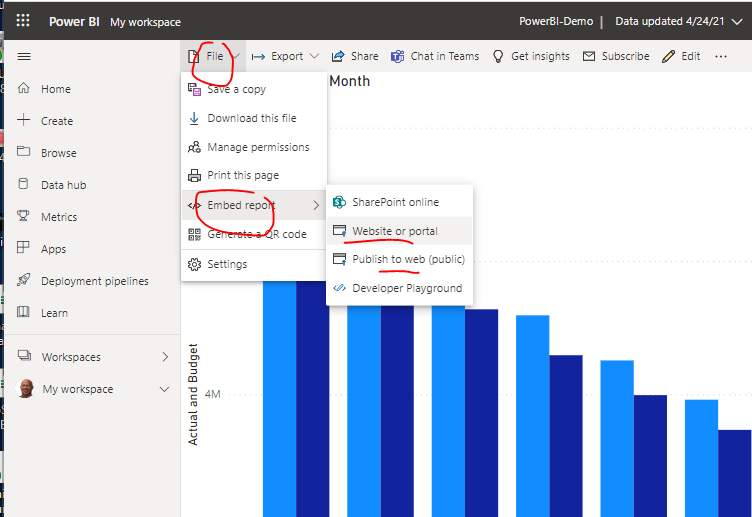
English: File · Embed report · Publish to web (public)
Besøg tælles med Umami på Loop24’s egen server i Stockholm. Der bruges ingen cookies, og ingen IP-adresser gemmes.
Microsoft, Windows, Microsoft Edge, Entra, Exchange, Microsoft 365, Outlook, Power BI and Teams are trademarks of the Microsoft group of companies. Android, Google Play, Google Workspace, Google Sheets and Google Slides are trademarks of Google LLC. App Store is a service mark of Apple Inc. Other product and company names belong to their owners; they say what LoopSign, LoopMeeting, LoopBooking and LoopVisit work with, and imply no affiliation or endorsement.