
Power BI
Integrer Power BI i LoopSign
Section titled “Integrer Power BI i LoopSign”For å vise innhold fra Power BI i LoopSign må du bruke innebyggingsfunksjonene.
- Velg Fil i Power BI, og deretter Bygg inn rapport og Publiser på nett (offentlig).
- Bruk URL-en i Website-vignetten i LoopSign, eller innebyggingskoden i HTML Code-vignetten.
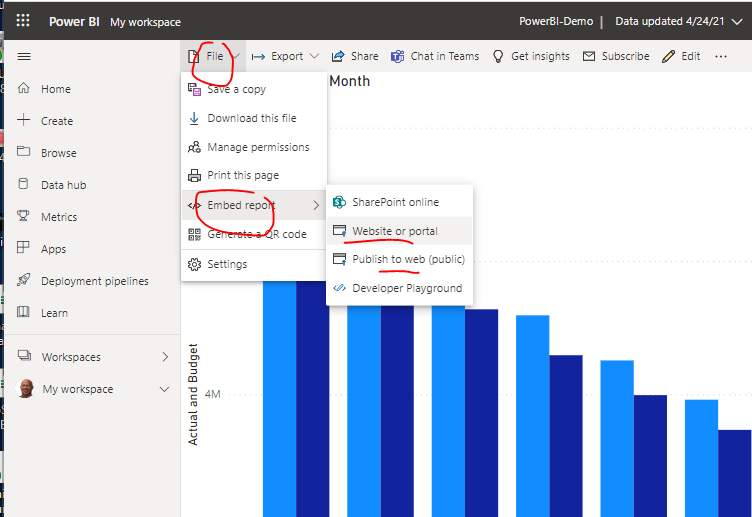
English: File · Embed report · Publish to web (public)
Besøk telles med Umami på Loop24s egen server i Stockholm. Det brukes ingen informasjonskapsler, og ingen IP-adresser lagres.
Microsoft, Windows, Microsoft Edge, Entra, Exchange, Microsoft 365, Outlook, Power BI and Teams are trademarks of the Microsoft group of companies. Android, Google Play, Google Workspace, Google Sheets and Google Slides are trademarks of Google LLC. App Store is a service mark of Apple Inc. Other product and company names belong to their owners; they say what LoopSign, LoopMeeting, LoopBooking and LoopVisit work with, and imply no affiliation or endorsement.