
Monitoring dashboard
How to configure the monitoring dashboard in LoopSign
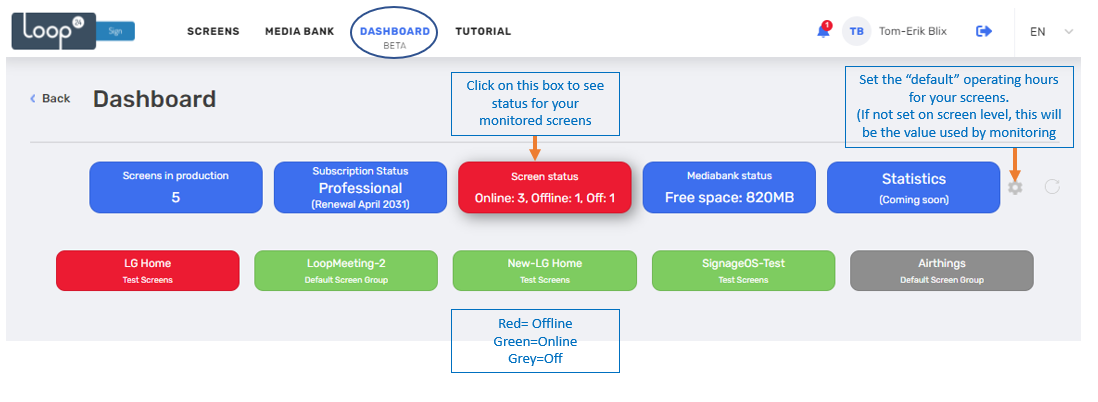
Section titled “How to configure the monitoring dashboard in LoopSign”The Dashboard function in LoopSign gives you an overview of the status of your screens. Open it with Dashboard in the top menu of the Screens overview.
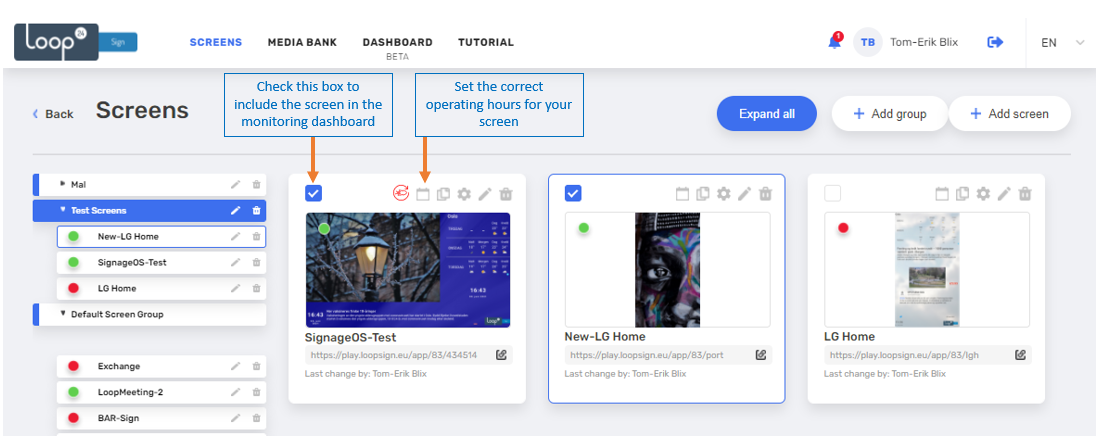
- Select the screens you want to monitor: in the Screens overview, tick the checkbox in the upper left corner of each screen’s card.
- Set the operating hours for each screen with the calendar icon on its card, so that they match the on/off timer of the player or screen that plays the content.
Visits are counted with Umami on Loop24’s own server in Stockholm. No cookies, and no IP addresses are stored.
Microsoft, Windows, Microsoft Edge, Entra, Exchange, Microsoft 365, Outlook, Power BI and Teams are trademarks of the Microsoft group of companies. Android, Google Play, Google Workspace, Google Sheets and Google Slides are trademarks of Google LLC. App Store is a service mark of Apple Inc. Other product and company names belong to their owners; they say what LoopSign, LoopMeeting, LoopBooking and LoopVisit work with, and imply no affiliation or endorsement.