
ProDVX panels
This guide installs LoopMeeting on ProDVX panels. It applies to the APPC-10SLBN, APPC-10XPL and APPC-10SLBe.
Install the LoopMeeting app
Section titled “Install the LoopMeeting app”- Download the ProDVX installation kit: https://dl.loop24.no/prodvx.zip
- Unzip the file to a folder, for example
c:\adb. - Connect the ProDVX panel to your computer with a USB to Micro USB cable.
- Make sure the panel is powered, from PoE or the power supply.
- Enable Developer options on the panel:
- Enter Settings and select About device.
- Go to the last line in About, Build number.
- Tap Build number repeatedly until the panel says you are in developer mode.
- Go back and enter the System menu.
- Select Developer options.
- Scroll down and enable USB Debugging.
- Start a command prompt or terminal and go to the directory where you unzipped the installation kit (
c:\adb). - Run
adb devicesto make sure the ProDVX device is connected and running.
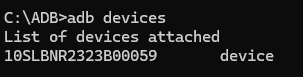
When the device shows as connected, as in the example above, run prodvx.cmd.
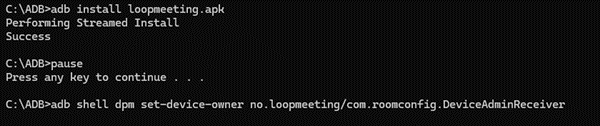
The LoopMeeting app is now installed and set as device owner.
Turn off developer mode
Section titled “Turn off developer mode”For security reasons, turn off Android developer mode:
- Enter the Android settings.
- Select System and Developer options.
- Turn off Use developer options.
Reboot and enroll the panel
Section titled “Reboot and enroll the panel”Reboot the device; the LoopMeeting app should start automatically. Then enroll the panel in the RoomConfig portal: Configure the portal, section 6.
Visits are counted with Umami on Loop24’s own server in Stockholm. No cookies, and no IP addresses are stored.
Microsoft, Windows, Microsoft Edge, Entra, Exchange, Microsoft 365, Outlook, Power BI and Teams are trademarks of the Microsoft group of companies. Android, Google Play, Google Workspace, Google Sheets and Google Slides are trademarks of Google LLC. App Store is a service mark of Apple Inc. Other product and company names belong to their owners; they say what LoopSign, LoopMeeting, LoopBooking and LoopVisit work with, and imply no affiliation or endorsement.