
Settings
Here you will find information on how to configure the LoopVisit settings.
Company and default tenant settings
Section titled “Company and default tenant settings”The menu item Settings holds the default settings for the solution and the default settings for the tenants. Most settings can be customised under the tenant settings (see Custom settings in Tenants), and in most cases the tenants need custom settings.
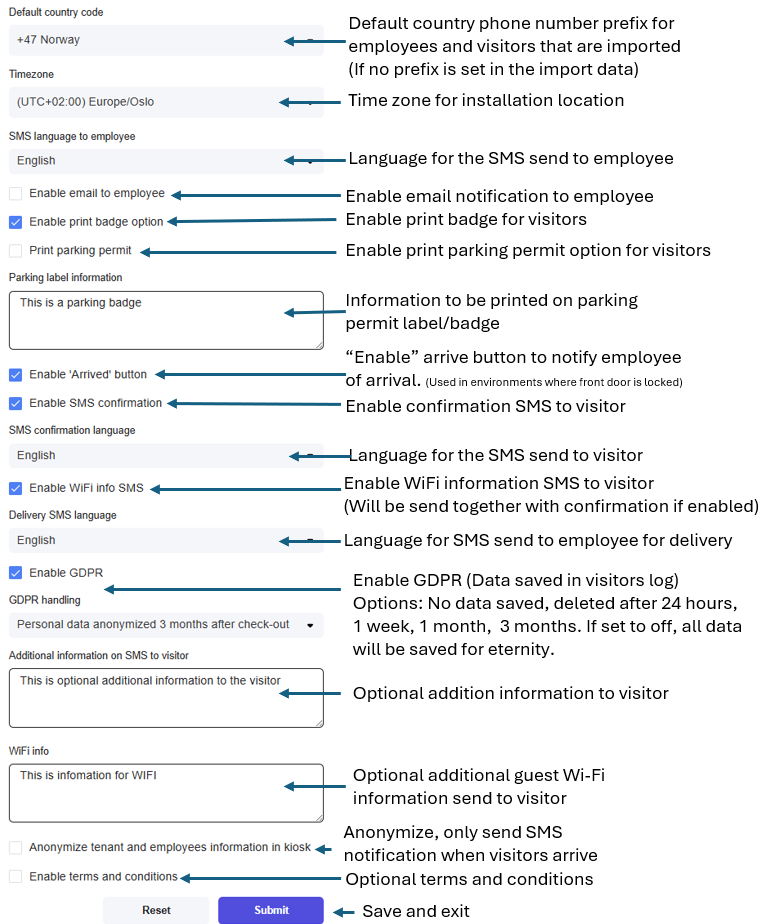
The screenshot shows the settings from top to bottom.
Country code and time zone
Section titled “Country code and time zone”Default country code is the phone number prefix for imported employees and visitors when the import data has none, and Timezone is the time zone of the installation.
Notifying the employee
Section titled “Notifying the employee”SMS language to employee sets the language of the SMS sent to the employee, and Enable email to employee adds an email notification. Two newer options, not in the picture, sit below it: Enable SMS message to employee, whose note asks you to make sure that each of your employees has a phone number entered, and Enable Teams message to employee; for the Teams message, see Teams notifications. Delivery SMS language is the language of the SMS an employee gets about a delivery.
Badge, parking permit and the Arrived button
Section titled “Badge, parking permit and the Arrived button”Enable print badge option and Print parking permit give visitors those two print options (the badge printer itself is enabled per kiosk, under Kiosk settings); Parking label information is the text printed on the parking permit label. To print badges for pre-registered visitors from the portal on a reception PC, see Print visitor badges. Enable ‘Arrived’ button shows a button that notifies the employee of the arrival (used where the front door is locked).
SMS to the visitor
Section titled “SMS to the visitor”Enable SMS confirmation sends a confirmation SMS to the visitor, in the SMS confirmation language. Enable WiFi info SMS sends the guest Wi-Fi information, together with the confirmation if that is enabled; the text goes in WiFi info. Additional information on SMS to visitor is an optional text for the visitor.
GDPR, privacy and terms
Section titled “GDPR, privacy and terms”Enable GDPR with GDPR handling sets how long personal data stays in the visitor log: no data saved, or anonymized after 24 hours, 1 week, 1 month or 3 months (the picture shows “Personal data anonymized 3 months after check-out”). With GDPR off, all data is kept. Anonymize tenant and employees information in kiosk hides all tenant and employee names on the kiosk: the visitor only registers, and the reception is notified by SMS. Enable terms and conditions adds optional terms and conditions.
Submit saves and exits; Reset is beside it.
Visits are counted with Umami on Loop24’s own server in Stockholm. No cookies, and no IP addresses are stored.
Microsoft, Windows, Microsoft Edge, Entra, Exchange, Microsoft 365, Outlook, Power BI and Teams are trademarks of the Microsoft group of companies. Android, Google Play, Google Workspace, Google Sheets and Google Slides are trademarks of Google LLC. App Store is a service mark of Apple Inc. Other product and company names belong to their owners; they say what LoopSign, LoopMeeting, LoopBooking and LoopVisit work with, and imply no affiliation or endorsement.