
Raspberry Pi
The LoopSign deployment image for Raspberry Pi.
Raspberry Pi 5 (recommended) and Raspberry Pi 4
Section titled “Raspberry Pi 5 (recommended) and Raspberry Pi 4”- Raspberry Pi 5 and Raspberry Pi 4: set up the player with the LoopSign image.
LoopSign custom image version 2025.5, based on the original Raspberry Pi OS (Debian 12, bookworm). Download: https://sos.loopsign.eu/LS_Image/ls_image_2025_5_pi5.img.gz
Older models
Section titled “Older models”Raspberry Pi 3
Section titled “Raspberry Pi 3”The Raspberry Pi 3, released in early 2016, is not recommended as a LoopSign player. It might still work in light scenarios, for example showing only text and images from the LoopSign screen in your account.
- Raspberry Pi 3 and 4, image 2024.8: set up the player with the older LoopSign image.
LoopSign custom image version 2024.8, based on the original Raspberry Pi OS (Debian 12, bookworm). Download: https://sos.loopsign.eu/LS_Image/ls_image_2024_8_pi4.img.gz
Downgrade Chromium on an older image
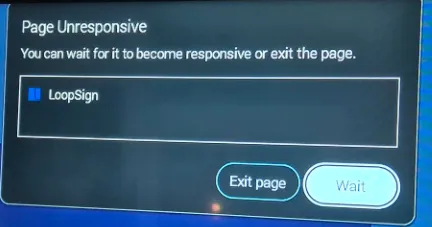
Section titled “Downgrade Chromium on an older image”Some customers have reported problems with the latest Chromium version on the Raspberry Pi 3 and 4. If the display shows the message below, downgrade Chromium to version 113, or reinstall the image: see the 2024.8 image guide.
-
Install Pi-Apps: open a Terminal window and run this command:
Terminal window wget -qO- https://raw.githubusercontent.com/Botspot/pi-apps/master/install | bashTip: copy the command to the clipboard (Ctrl+C), then select Edit and Paste in the terminal window’s menu.
-
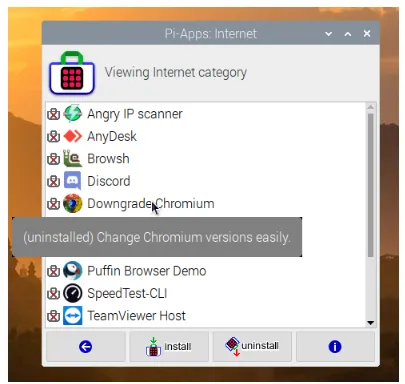
When Pi-Apps is installed, start it and select the Internet category, then Browsers.
-
Select Downgrade Chromium and install the application.
-
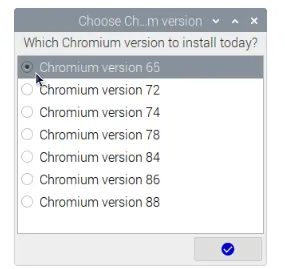
Select to downgrade to Chromium 113.
Visits are counted with Umami on Loop24’s own server in Stockholm. No cookies, and no IP addresses are stored.
Microsoft, Windows, Microsoft Edge, Entra, Exchange, Microsoft 365, Outlook, Power BI and Teams are trademarks of the Microsoft group of companies. Android, Google Play, Google Workspace, Google Sheets and Google Slides are trademarks of Google LLC. App Store is a service mark of Apple Inc. Other product and company names belong to their owners; they say what LoopSign, LoopMeeting, LoopBooking and LoopVisit work with, and imply no affiliation or endorsement.