
Entra ID login
How to set up Microsoft Entra ID login authentication for LoopSign
Section titled “How to set up Microsoft Entra ID login authentication for LoopSign”You can enable Microsoft Entra ID authentication for LoopSign. It can be set at the distributor, reseller and company level; this guide covers the company level, but the approach is the same for all levels.
Create the groups in Entra ID
Section titled “Create the groups in Entra ID”If you want both administrators and users, you need two Microsoft Entra ID groups, one for administrators and one for users. Then add the users to the groups as desired. Note the following:
- A user cannot be a member of both the administrator and the user group.
- If you administer several companies, you cannot add the same group ID to different companies.
- A user can be a member of groups belonging to different companies; each company has its own group IDs in its settings.
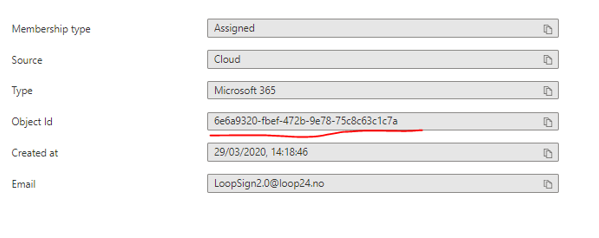
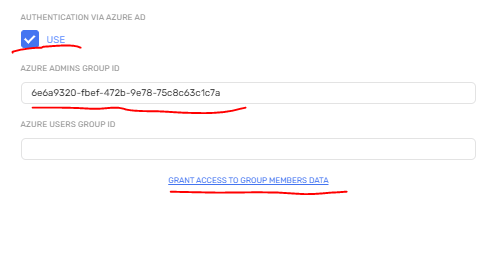
Make a note of the group’s object ID. It goes into the Microsoft Entra ID authentication settings in the LoopSign company settings.
Enable Entra ID login in LoopSign
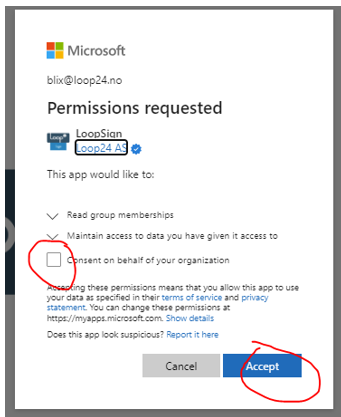
Section titled “Enable Entra ID login in LoopSign”In the company settings (Edit Company), enable the Use toggle under Authentication via Azure AD, enter the group IDs and select Grant Access To Group Members Data. The consent is needed once per Entra ID tenant; the toggle and the group IDs are set per company. Grant Access To Group Members Data opens the Microsoft consent page: sign in with a Global Administrator account of the tenant to authorise the LoopSign application.
To enable Entra ID authentication, LoopSign needs the following permissions:
- Read group memberships
- Maintain access to data you have given it access to
Tick Consent on behalf of your organization and select Accept.
Visits are counted with Umami on Loop24’s own server in Stockholm. No cookies, and no IP addresses are stored.
Microsoft, Windows, Microsoft Edge, Entra, Exchange, Microsoft 365, Outlook, Power BI and Teams are trademarks of the Microsoft group of companies. Android, Google Play, Google Workspace, Google Sheets and Google Slides are trademarks of Google LLC. App Store is a service mark of Apple Inc. Other product and company names belong to their owners; they say what LoopSign, LoopMeeting, LoopBooking and LoopVisit work with, and imply no affiliation or endorsement.