
LoopMeeting 8″ In-wall
What it is
Section titled “What it is”The 8-inch in-wall panel is a 1280 × 800 touch panel that runs the LoopMeeting app and sits in the wall: it comes with an in-wall box and cannot be mounted on the surface of a wall or on glass. LED light on both sides of the panel shows the room’s status colour: green when the room is free, red when a meeting is running. The LoopMeeting licence comes with the panel and is not tied to it: if the panel breaks, the licence moves to a new panel, which therefore costs less. The panel talks directly to your scheduling system (Microsoft 365, Exchange, Google Workspace, LoopBooking or Nexudus); no extra software is needed.
For a panel that mounts on a wall or a glass wall, see LoopMeeting 8″ or LoopMeeting 10″.
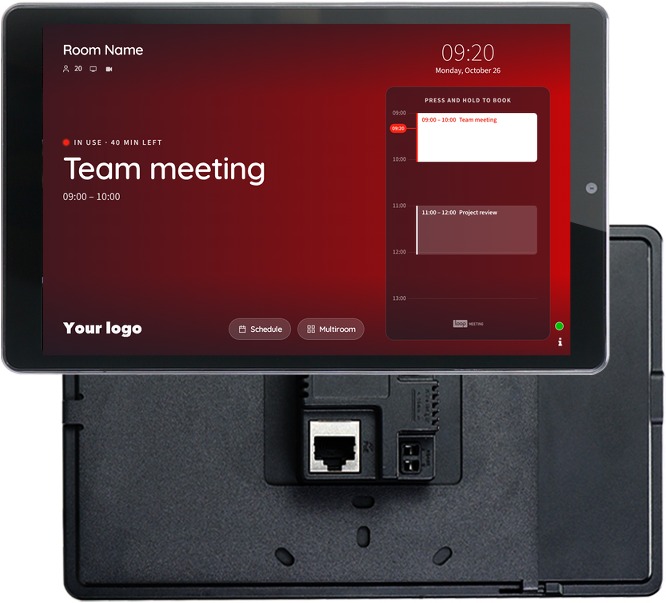
The panel switches between landscape and portrait mode automatically.
Specifications
Section titled “Specifications”| Screen | 8″ LCD (IPS), 1280×800, 16:10, 5-point capacitive touch, brightness 300 cd/m² |
| Processor, RAM, flash | RK3566, 2 GB RAM, 16 GB flash |
| Operating system | Android 11 |
| LED light | Yes, on both sides of the panel |
| Power | PoE+ (IEEE 802.3at) over LAN, 25.5 W peak, 5 to 10 W average. A 12 V power supply can be used but is not included; PoE is highly recommended |
| Network | LAN with PoE, Wi-Fi 802.11b/g/n |
| NFC | No |
| Dimensions | 200 mm × 124.6 mm × 37.7 mm |
| Mounting kit | In-wall box included; the panel cannot be mounted on the surface of a wall or on glass |
| Setup and management | The RoomConfig portal |
| Licence | Included; not tied to the panel. If the panel breaks, the licence moves to a new panel, which then costs less |
| Warranty | 2 years; an extra two or three years can be bought |
| Scheduling services | Microsoft 365, Google Workspace, LoopBooking, Nexudus, Exchange 2010, 2013, 2016 and 2019 |
The app’s functions on the panel (custom logo and background, stop and extend a meeting, book other rooms, report equipment failure, the reception overview, the Clean room feature, 19 languages) are the same as on every LoopMeeting panel; see App functions.
Ports and buttons
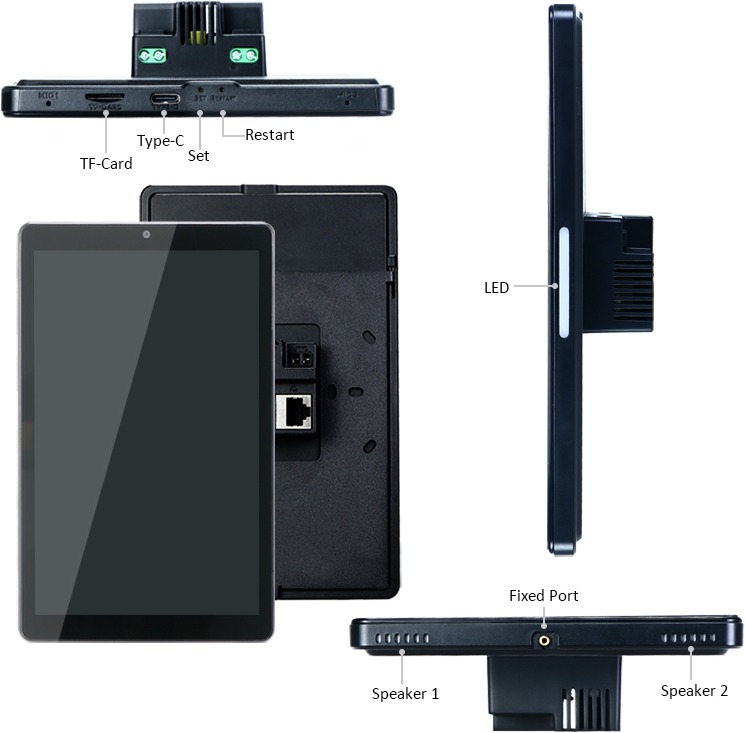
Section titled “Ports and buttons”Along the top edge: a TF (microSD) card slot, a USB-C port, and the Set and Restart buttons. On the back: the network port (RJ45, with PoE). Along the bottom edge: two speakers and a fixing point (Fixed Port in the drawing). The LED light runs along the sides.
Mounting
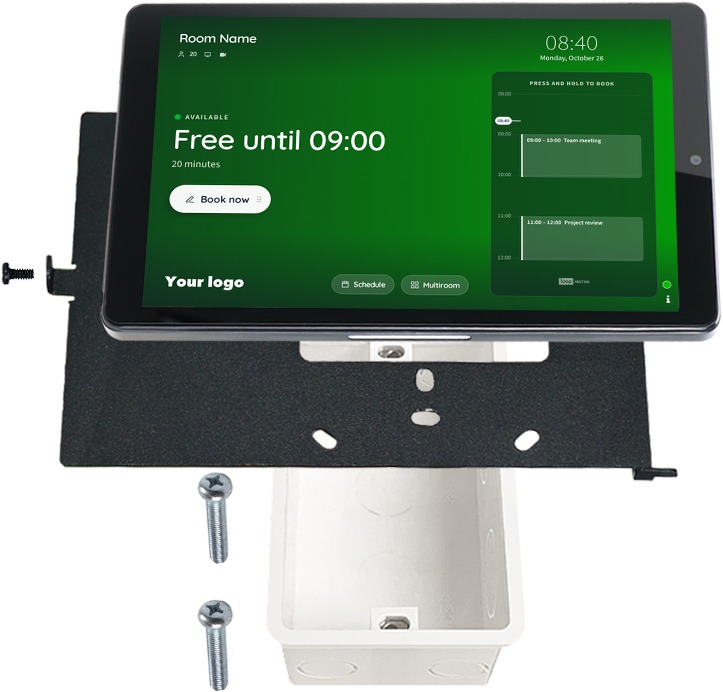
Section titled “Mounting”The in-wall box goes into the wall, the mounting plate is screwed onto the box, and the panel sits on the plate. The Mounting page (glass walls, the glued bracket) is for the 10-inch and 8-inch panels.
Visits are counted with Umami on Loop24’s own server in Stockholm. No cookies, and no IP addresses are stored.
Microsoft, Windows, Microsoft Edge, Entra, Exchange, Microsoft 365, Outlook, Power BI and Teams are trademarks of the Microsoft group of companies. Android, Google Play, Google Workspace, Google Sheets and Google Slides are trademarks of Google LLC. App Store is a service mark of Apple Inc. Other product and company names belong to their owners; they say what LoopSign, LoopMeeting, LoopBooking and LoopVisit work with, and imply no affiliation or endorsement.